Loop Engineering vs. Graph Engineering: The Evolution of Agentic Architectures
Loop Engineering vs. Graph Engineering: The Evolution of Agentic Architectures
Introduction
As artificial intelligence moves from static single-prompt interactions toward autonomous agentic workflows, software architects face a fundamental engineering challenge: how do we transform probabilistic language model outputs into deterministic, enterprise-grade software systems?
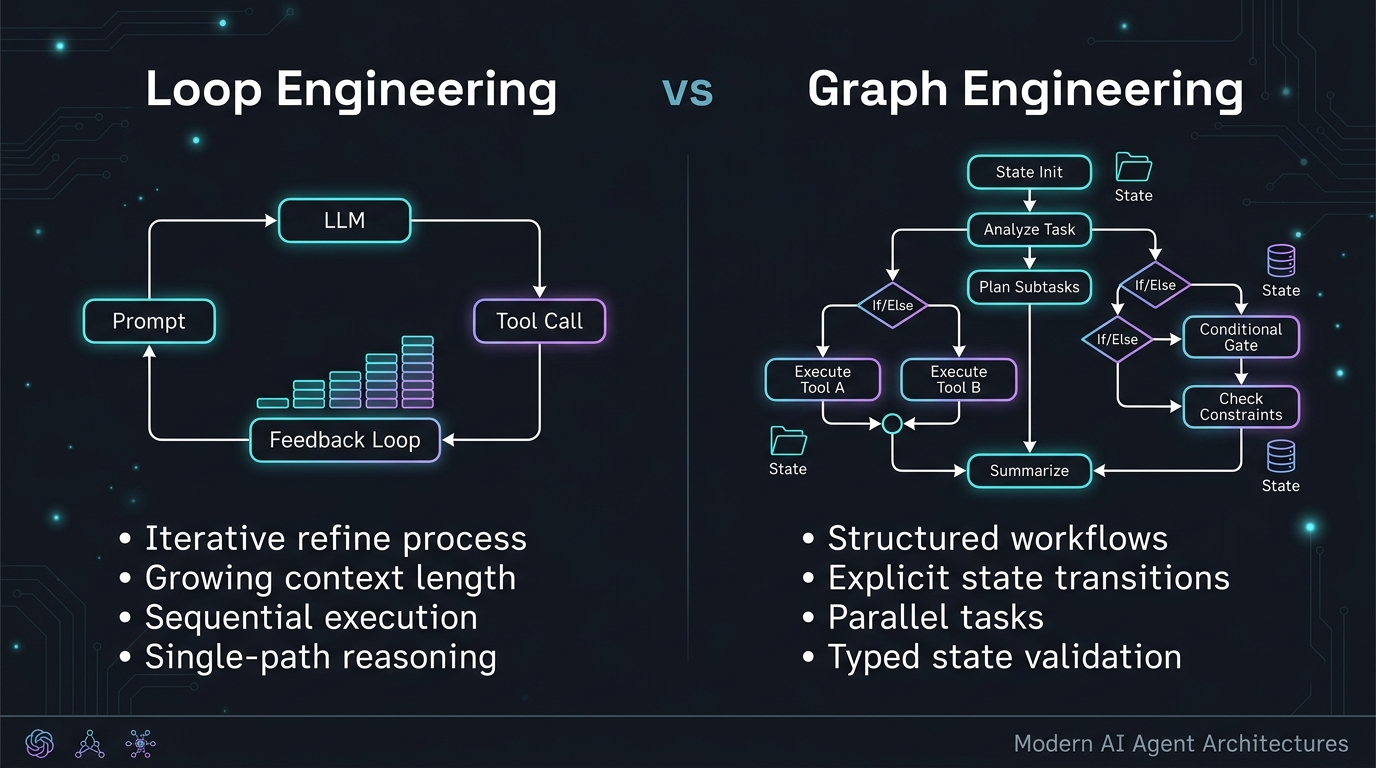
In the early days of agent building, the dominant design pattern was Loop Engineering. Built around iterative reasoning paradigms such as the ReAct (Reasoning and Acting) framework, Loop Engineering relied on a simple conceptual model: prompt an LLM, inspect its proposed tool call, execute the tool, feed the observation back into the context window, and repeat inside a while loop until the model decides to stop.
While Loop Engineering enabled miraculous early prototypes, its operational limits quickly surfaced in production environments—context bloat, runaway execution cycles, non-deterministic routing, and fragile state management. To overcome these constraints, the industry is undergoing a structural paradigm shift toward Graph Engineering.
Graph Engineering models agent workflows as stateful Directed Acyclic Graphs (DAGs) and state machines. By decoupling control flow from pure model reasoning, Graph Engineering introduces explicit state schemas, deterministic routing edges, parallel task orchestration, and fine-grained failure handling.
In this deep dive, we will explore the architectural mechanics of both paradigms, analyze their trade-offs, inspect clean Python implementations, and highlight why Graph Engineering is becoming the gold standard for production AI systems.
Understanding Loop Engineering
The ReAct Pattern and Iterative Cycles
Loop Engineering is rooted in the idea of dynamic self-correction. Instead of requiring developers to hardcode every logical step, the model acts as both controller and reasoner.
The canonical loop follows a four-step lifecycle:
- Thought: The model analyzes the current prompt and past history.
- Action: The model emits a structured request to call an external tool or perform an operation.
- Observation: The runtime executes the tool and appends the result to the history array.
- Evaluation: The model evaluates whether the task goal is satisfied. If incomplete, it loops back to step 1.
1
2
3
4
5
6
7
8
+-------------------------------------------------------------+
|                     Loop Engineering Cycle                  |
|                                                             |
|   Prompt ---> [ LLM Reasoner ] ---> [ Tool Execution ]      |
|                      ^                        |             |
|                      |                        v             |
|                      +--- [ Context History ] <             |
+-------------------------------------------------------------+
Why Loop Engineering Succeeded First
Loop Engineering succeeded initially because of its simplicity and adaptability:
- Minimal Upfront Design: Developers do not need to map out every conditional branch. The LLM dynamically decides which tool to call next based on intermediate tool responses.
- Fluid Problem Solving: For exploratory or open-ended tasks (such as searching a database with variable query requirements), an unstructured loop can pivot dynamically.
- Low Initial Friction: Frameworks like early versions of LangChain or AutoGen made instantiating a ReAct agent achievable in under ten lines of code.
The Pitfalls of Production Loops
Despite its early success, Loop Engineering introduces severe failure modes when scaled to complex production systems:
- Context Drift and Window Bloat: As the loop iterates, raw tool outputs and past reasoning steps accumulate in the context array. Over time, irrelevant information degrades reasoning accuracy (context drift) while inflating token consumption and latency exponentially.
- Runaway Cost Loops: Without deterministic external circuit breakers, a model that misinterprets an unexpected tool error can enter infinite execution loops, exhausting API rate limits and generating massive cloud bills.
- Non-Deterministic Routing: When complex conditional logic (e.g., if step A succeeds with metric > 80, proceed to B, else trigger fallback C) is left entirely to model prompts, small prompt perturbations or LLM version updates can cause arbitrary routing failures.
- State Degradation: In Loop Engineering, “state” is synonymous with “append-only message history.” There is no strongly-typed, structured schema holding state variables, making transaction rollback or intermediate inspection difficult.
Entering Graph Engineering
The Graph Paradigm: Decoupling Control from Reasoning
Graph Engineering solves the fragility of loops by separation of concerns: the LLM is restricted to node-level reasoning, while execution order and state persistence are governed by a deterministic state machine.
In Graph Engineering:
- Nodes: Represent discrete, isolated units of execution (e.g., an LLM prompt call, a database query, an API request, or a human validation check).
- Edges: Define allowed transitions between nodes. Edges can be fixed (deterministic routing) or conditional (evaluating typed state values or structured LLM decisions).
- State: A centralized, strongly-typed schema (such as a
TypedDictor Pydantic model) that flows through every node. Nodes do not mutate global context directly; instead, they return clean state updates that are merged into the graph state.
1
2
3
4
5
6
7
8
9
10
11
12
13
+-------------------------------------------------------------+
|                   Graph Engineering Topology                |
|                                                             |
|    [ State Init ] ---> ( Node 1: Plan )                     |
|                                |                            |
|                       [ Conditional Edge ]                  |
|                             /        \                      |
|              ( Node 2A: Query )    ( Node 2B: Fallback )    |
|                             \        /                      |
|                      ( Node 3: Aggregate )                  |
|                                |                            |
|                            [ END ]                          |
+-------------------------------------------------------------+
Key Architectural Capabilities of Graph Engineering
1. Explicit State Schemas
Instead of sending 50 past raw chat messages back into the model, a graph node receives only the explicit fields defined in its state schema. This keeps context windows tight, focused, and token-efficient.
2. Deterministic Guardrails & Routing
A graph edge guarantees that a financial compliance agent cannot execute a funds transfer node without passing through a deterministic verification node first—regardless of how creative the LLM prompt attempts to be.
3. Parallel Execution (Fan-Out / Fan-In)
Graph architectures natively support parallel branch execution. For example, a research graph can split execution into three concurrent worker nodes analyzing different data sources simultaneously, then merge results at a downstream aggregator node.
4. Human-in-the-Loop (HITL) & Checkpointing
Because state is explicitly maintained at every edge boundary, graph frameworks can save state checkpoints to a persistence layer (e.g., PostgreSQL or Redis). This allows graphs to pause execution before a high-impact node, wait hours or days for human approval, and seamlessly resume from the exact checkpoint.
Head-to-Head Architectural Comparison
The following table summarizes the structural differences between Loop Engineering and Graph Engineering:
| Architectural Dimension | Loop Engineering | Graph Engineering |
|---|---|---|
| Control Flow | Dynamic, probabilistic (LLM-driven while loop) |
Structured, deterministic state machine (Nodes & Edges) |
| State Management | Append-only message history context | Centralized, strongly-typed schema (TypedDict / Pydantic) |
| Context Window Hygiene | Degrades over time (accumulates raw tool outputs) | Highly optimized (nodes consume only required state fields) |
| Execution Topology | Strictly sequential iterations | Sequential, parallel branching (fan-out/fan-in), sub-graphs |
| Error Handling | In-context model reflection (prone to hallucinations) | Edge-level try/catch, fallback branches, programmatic retries |
| Human In The Loop | Difficult to pause/resume cleanly | Native state checkpointing and pause/resume capabilities |
| Observability & Tracing | Linear chat log inspection | Node-by-node state transitions and step graph visualization |
| Development Friction | Low initial effort, high debugging friction | Higher upfront planning, low long-term maintenance cost |
Code / Technical Section
To contrast the design patterns, let us examine how both paradigms implement a multi-step task involving query planning, tool execution, and error handling in Python.
1. Loop Engineering Implementation (ReAct Loop)
In a pure loop architecture, state is maintained as a growing list of messages passed recursively to the model:
1
2
3
4
5
6
7
8
9
10
11
12
13
14
15
16
17
18
19
20
21
22
23
24
25
26
27
28
29
30
31
32
33
34
35
36
37
38
39
40
41
42
43
import json
from typing import List, Dict, Any

class LoopAgent:
    def __init__(self, model_client, tools: Dict[str, Any]):
        self.model = model_client
        self.tools = tools
        self.history: List[Dict[str, str]] = []

    def run(self, user_goal: str, max_iterations: int = 5) -> str:
        self.history.append({"role": "user", "content": user_goal})

        for iteration in range(max_iterations):
            # The model is forced to decide both reasoning and routing
            response = self.model.generate(messages=self.history)
            self.history.append({"role": "assistant", "content": response.text})

            if response.is_final_answer:
                return response.final_output

            # Extract tool call from response
            tool_name = response.tool_name
            tool_args = response.tool_args

            if tool_name in self.tools:
                try:
                    # Execute tool and append raw output to context
                    observation = self.tools[tool_name](**tool_args)
                    self.history.append({
                        "role": "tool",
                        "name": tool_name,
                        "content": json.dumps(observation)
                    })
                except Exception as e:
                    # In a loop, errors are fed back as text, hoping the model self-corrects
                    self.history.append({
                        "role": "system",
                        "content": f"Tool execution failed: {str(e)}. Please retry."
                    })
            else:
                self.history.append({"role": "system", "content": "Invalid tool requested."})

        raise TimeoutError("Agent exceeded maximum allowed loop iterations.")
Observations on Loop Code:
- As
max_iterationsincreases,self.historycontinuously grows. - If a tool fails, the error message is simply pushed into
self.history, which can lead to hallucinated retry loops if the prompt context is saturated.
2. Graph Engineering Implementation (State Graph)
In Graph Engineering, we define a typed state object, discrete handler functions for nodes, and explicit edge routing:
1
2
3
4
5
6
7
8
9
10
11
12
13
14
15
16
17
18
19
20
21
22
23
24
25
26
27
28
29
30
31
32
33
34
35
36
37
38
39
40
41
42
43
44
45
46
47
48
49
50
51
52
53
54
55
56
57
58
59
60
61
62
63
64
65
66
67
68
69
70
71
72
73
74
75
76
77
78
79
80
81
82
83
84
from typing import TypedDict, Annotated, List, Literal
from langgraph.graph import StateGraph, END, START

# 1. Define strongly-typed Graph State
class AgentState(TypedDict):
    query: str
    plan_steps: List[str]
    current_step_idx: int
    data_results: List[dict]
    error_count: int
    final_report: str

# 2. Node Functions (Isolated state transitions)
def planner_node(state: AgentState) -> dict:
    """Node: Breaks query down into structured plan steps."""
    # LLM call focused solely on planning
    steps = ["fetch_database", "verify_records", "summarize_findings"]
    return {"plan_steps": steps, "current_step_idx": 0, "error_count": 0}

def fetch_data_node(state: AgentState) -> dict:
    """Node: Executes query for current step."""
    try:
        # Isolated execution
        result = {"id": 101, "status": "active", "value": 4500}
        return {
            "data_results": state.get("data_results", []) + [result],
            "current_step_idx": state["current_step_idx"] + 1
        }
    except Exception as e:
        return {"error_count": state["error_count"] + 1}

def fallback_recovery_node(state: AgentState) -> dict:
    """Node: Programmatic recovery when primary node fails."""
    # Deterministic fallback logic without wasting LLM tokens
    cached_result = {"id": 101, "status": "cached", "value": 0}
    return {
        "data_results": state.get("data_results", []) + [cached_result],
        "current_step_idx": state["current_step_idx"] + 1,
        "error_count": 0
    }

def synthesizer_node(state: AgentState) -> dict:
    """Node: Compiles final report from structured state."""
    results = state["data_results"]
    report = f"Analysis complete for '{state['query']}'. Processed {len(results)} records."
    return {"final_report": report}

# 3. Conditional Edge Routing Logic
def route_after_fetch(state: AgentState) -> Literal["fetch_data", "fallback_recovery", "synthesizer"]:
    """Deterministic routing function evaluating explicit state variables."""
    if state["error_count"] > 2:
        return "fallback_recovery"

    if state["current_step_idx"] < len(state["plan_steps"]):
        return "fetch_data"

    return "synthesizer"

# 4. Construct Graph Topology
builder = StateGraph(AgentState)

builder.add_node("planner", planner_node)
builder.add_node("fetch_data", fetch_data_node)
builder.add_node("fallback_recovery", fallback_recovery_node)
builder.add_node("synthesizer", synthesizer_node)

builder.add_edge(START, "planner")
builder.add_edge("planner", "fetch_data")

# Route conditionally based on state metrics
builder.add_conditional_edges(
    "fetch_data",
    route_after_fetch,
    {
        "fetch_data": "fetch_data",
        "fallback_recovery": "fallback_recovery",
        "synthesizer": "synthesizer"
    }
)
builder.add_edge("fallback_recovery", "synthesizer")
builder.add_edge("synthesizer", END)

# Compile Graph
graph_app = builder.compile()
Key Advantages in the Graph Code:
- Isolation: Each node receives and returns only relevant keys.
- Deterministic Circuit Breakers: If
error_count > 2, the edge instantly routes tofallback_recoverywithout asking the LLM what to do next. - Predictable Execution: Every state transition is observable, loggable, and mockable in unit tests.
Conclusion
The shift from Loop Engineering to Graph Engineering represents the maturation of AI application development. Just as early web development evolved from monolithic procedural scripts to modern microservices and stateful frontend frameworks, AI engineering is moving from unstructured prompt loops to disciplined state-graph architectures.
Loop Engineering remains a valuable tool for rapid prototyping, open-ended research assistants, and simple utility scripts. However, when building system-critical enterprise solutions—where cost, latency, safety, and deterministic execution are non-negotiable—Graph Engineering is essential.
By wrapping probabilistic intelligence inside deterministic graph guardrails, software teams can build agentic systems that are resilient, observable, and ready for production scale.